
Sentry Pro for Tesla
Sentry Brain S.M.P.C.Auto & Vehicles
4.468.00 Reviews
- Version
- 1.5.71
- Installs
- 10.00K
- Age Rating
- Everyone
Screenshots
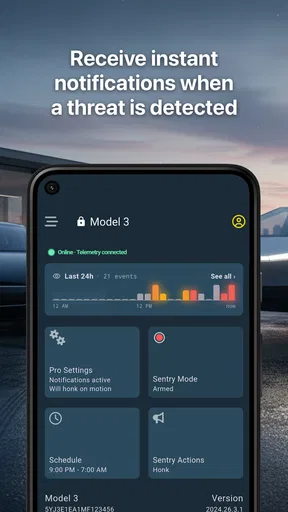
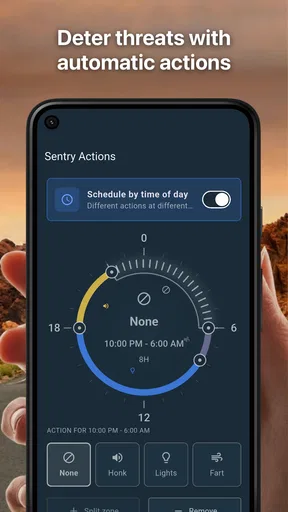
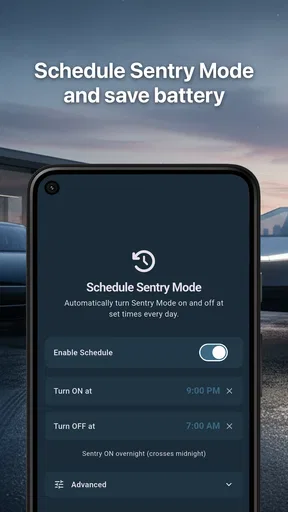
Our Review of Sentry Pro for Tesla
 Analysis by Appyee
Ever wished you could know exactly what's happening with your Tesla while you're away from the car? Enter Sentry Pro—Tesla Notifications, an app that promises to keep you in the loop with real-time updates and alerts. I recently took this app for a spin, and let me tell you, it's like having a personal assistant for your Tesla. Here’s everything you need to know about this nifty app.
Who gets the most from a second channel of alerts?
I see the clearest use for this app among Tesla owners who park in shared garages, busy public lots, or unfamiliar places and want another way to notice activity around the car. It is less compelling if your Tesla usually sits in a private garage and you rarely check vehicle alerts already. The value is not that it replaces attention or makes a car immune to damage; it is that a timely prompt can help you decide whether to check the situation rather than discover a concern much later.
A practical routine is to treat notifications as a cue, not a verdict. If an alert arrives while I am at work, I would first consider whether the car is somewhere I can safely inspect, then use the vehicle’s own tools or ask someone nearby to check if appropriate. That keeps the app useful without encouraging a frantic response to every notification. Alerts can draw attention, but they cannot tell me the full context of what happened around the vehicle.
How it fits beside Tesla’s own tools
Tesla owners already have the official app as the natural place to check vehicle information and control supported functions. Sentry Pro makes most sense as a focused companion for people who specifically want notifications and actions around detected threats, rather than as a replacement for the official app. I would keep the Tesla app available for everyday vehicle checks and use this one only if its alert workflow solves a real gap in how I monitor the car.
That distinction also helps set expectations. A companion app depends on the Tesla connection and on the car being able to detect the event in the first place. It cannot turn an undetected incident into a detected one, and a phone notification is not the same thing as continuous live video or a guaranteed security response. If you mainly want vehicle controls, the official app may be enough; if you want a more alert-centered approach, trying this app could make sense.
Getting Started with Sentry Pro
Kicking things off, the installation process for Sentry Pro—Tesla Notifications is a breeze. A quick download from the App Store or Google Play, and you're ready to roll. The interface is clean and intuitive, which means you won’t be fumbling around trying to figure out what does what. As soon as you open the app, it prompts you to log in with your Tesla account. A couple of taps later, and voilà, you’re connected.
Features that Stand Out
This app is packed with features, but a few really caught my attention. The real-time notifications are a game-changer. Whether someone’s too close to your car or your Tesla detects an incident, you get an instant alert on your phone. It’s like having eyes on your car 24/7, which is reassuring if you’re like me and tend to worry about your car when parked in public spaces.
Another highlight is the remote access capabilities. You can do everything from checking your battery level to starting or stopping charging sessions. It’s all about convenience and control, right in the palm of your hand.
Making alerts useful rather than noisy
The most helpful way to set up an alerting app is to begin with the events I genuinely need to act on, then adjust after living with that setup. If I enable every possible notification from day one, ordinary vehicle activity can compete with the alerts I care about. The original experience described here includes options for events such as door unlocks and charging status, so I would decide whether those matter during the hours I am away, rather than treating every toggle as essential.
For a daily driver, charging notifications can be useful when a session needs attention or when I want a quick status check without opening the car’s controls. For a car parked overnight, security-related alerts may matter more. These are different jobs, and separating them mentally makes it easier to keep the phone’s notification stream readable. I would also check the phone’s notification settings if alerts seem quiet; an app can only be as noticeable as the device settings allow.
One trade-off is that more alerts can mean more interruptions, especially when a car is parked somewhere with frequent activity. Rather than switching the app off after a noisy afternoon, I would first narrow the events I receive and see whether that improves the signal-to-noise balance. If a particular location repeatedly produces alerts that do not lead to useful action, that is a good reason to reconsider whether constant monitoring is worthwhile there.
Performance and Reliability
In terms of performance, the app runs smoothly without hiccups. The notifications are prompt, and I haven’t experienced any delays that would make me question its reliability. The connectivity with the Tesla system is seamless, and the app doesn’t drain your phone’s battery, which is always a plus.
One of the coolest things is how customizable the alerts are. You can set it up to notify you about specific things like door unlocks or charging statuses. It’s all about tailoring the app to fit your needs.
What the connection can and cannot promise
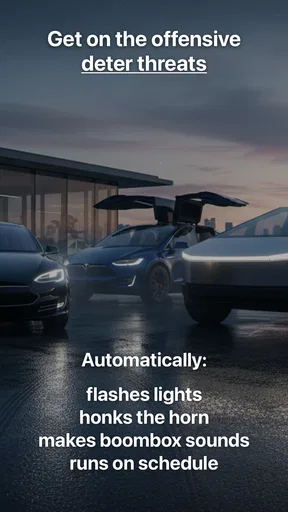
For anyone wondering whether this means a constant, guaranteed watch over the car, I would keep the expectation more modest. The app’s role is to pass along alerts and provide actions when threats are detected; the chain relies on the vehicle recognizing an event, the connection working, and the phone receiving its notification. A late or missed alert is therefore possible in the broad sense that any connected service can be affected by interruptions. I would not use it as a substitute for sensible parking or a direct check when something genuinely urgent happens.
It is also worth thinking through account access before connecting any vehicle-related service. I would read the sign-in prompts carefully, use a password I do not reuse elsewhere, and make sure I understand which account is being linked. That is practical caution, not a claim about this app’s security policy. If you share a Tesla with family, agree on who should receive alerts and who is authorized to use actions, so one person’s settings do not create confusion for everyone else.
User Experience
Using Sentry Pro feels like having a direct line to your Tesla. The design is sleek, and navigation is straightforward. The app developers clearly put a lot of thought into making sure it’s user-friendly. I’m all about apps that don’t require a manual to figure out, and this one fits the bill perfectly.
The support team is also worth mentioning. I had a couple of questions during setup, and their response was swift and helpful. It’s nice to know that support is just a message away if needed.
Who should pause before installing?
I would skip it if I do not own or manage a Tesla, since its purpose is tied directly to that vehicle ecosystem. I would also pass if I prefer to keep vehicle access inside Tesla’s own app, do not want to connect a separate service, or rarely need extra alerts. People who expect a companion app to provide independent surveillance, emergency dispatch, or guaranteed event recording are likely to be disappointed: that is a different kind of product and a different set of expectations.
There is a small but important setup question to answer before relying on it: does the app receive the kinds of alerts I actually want in the places where I park? I would test the workflow during a normal, low-stakes day and confirm that notifications appear on the phone before counting on them. If I travel, change phones, or alter notification settings, I would check again rather than assuming the previous setup still behaves exactly as before.
Its place in the Tesla app landscape
In the broader auto-and-vehicle app category, many alternatives focus on navigation, maintenance records, fuel or charging tools, or general vehicle controls. Sentry Pro is more narrowly useful: its appeal is the connection between detected threats, alerts, and actions. That focus can be a strength if this is the missing piece in your routine, but it also means it is not a general-purpose ownership dashboard. I would not install it expecting trip planning or a full service history.
The developer is Sentry Brain S.M.P.C., and the app is free to install, with in-app purchases priced from $5.99 to $133.99 per item. I would check what a purchase unlocks and whether it suits my own alert needs before paying; the free download is a chance to assess the fit, not a reason to assume every capability costs nothing. Its Everyone age rating and minimum Android requirement of 7.0 make the basic audience broad, but the Tesla-specific purpose remains the real eligibility test.
What has changed, and what existing users should check
The current Android release is version 1.5.59, and the app first appeared on August 24, 2023. Those details establish the version and release history, but they do not by themselves tell me which features changed between releases. I would avoid treating a version number as proof of a particular improvement. Existing users should read the in-app or store update notes when installing an update and check that important alert choices still match their routine afterward.
That quick check matters because alerting tools are only helpful when the settings remain intentional. After an update, I would confirm that notifications are still enabled at both the app and phone level, then verify the events I want rather than assuming nothing changed. If the app is behaving differently, a careful check of account connection and notification permissions is a sensible first step before rebuilding the entire setup.
For a newer Tesla owner, the decision is simpler: start with the official Tesla app, learn which alerts and controls already cover your needs, and add Sentry Pro only if you can name a specific gap. For an experienced owner, the question is whether another notification path reduces the time between a detected event and a useful response. A tool does not earn a permanent place on my phone just because it offers more switches; it earns it when those switches solve a recurring problem.
Final Thoughts
All in all, Sentry Pro—Tesla Notifications is a solid addition to any Tesla owner’s toolkit. It’s not just about the peace of mind that comes with knowing what’s happening with your car, but also the empowerment of having control at your fingertips. Whether you’re new to Tesla or a seasoned owner, this app is definitely worth checking out.
If you’re ready to enhance your Tesla experience, give Sentry Pro a try. It’s like having a personal security team and assistant rolled into one. You can find the download links for both Android and iOS on our website. Happy driving!
My recommendation in practical terms
On Google Play, the app has a 4.3 average from over 270 ratings, with more than 50 written reviews and over 10,000 installs. That is a useful sign that other drivers have tried it, but I would weigh those figures less than whether the app’s particular alert workflow fits my own parking and charging habits. For me, the strongest reason to try it is a recurring need to notice Tesla activity without repeatedly opening the main vehicle app.
My recommendation is to approach it as a targeted companion, not an all-in-one security solution. If an extra alert channel would help you respond more deliberately when your Tesla is parked away from home, it is worth exploring. If you mainly want broad vehicle management, or if more notifications would add stress rather than reassurance, sticking with the tools you already use is a perfectly sensible choice.
Verdict
Strengths of Sentry Pro for Tesla
- Real-time vehicle status updates.
- Customizable alert settings.
- User-friendly interface design.
- Integration with smart devices.
- Secure data encryption.
Limitations of Sentry Pro for Tesla
- Requires a stable internet connection.
- Subscription fee for premium features.
- Limited to Tesla vehicles only.
- Occasional notification delays.
- Battery drain on frequent use.
Similar Picks in This Category
View All
Android Auto
Google LLC4.1

maxim — order a taxi & food
PT. SITO4.7

Штрафы ГИБДД: проверка с фото
Pays LLC – Штрафы ГИБДД4.7

Номерограм – проверка авто
Авто Ассист4.8

Дром Авто
Дром4.9

Frequently Asked Questions
What features does Sentry Pro—Tesla Notifications offer?
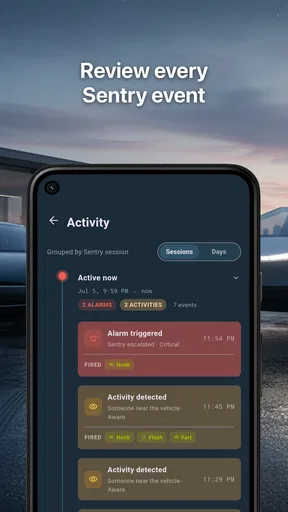
Sentry Pro—Tesla Notifications provides real-time alerts for Tesla owners, notifying them of potential security threats or nearby activity. The app integrates seamlessly with your Tesla vehicle, offering customizable notification settings, a detailed event history, and remote access to live camera feeds. It's designed to enhance the security and convenience of owning a Tesla.
Is Sentry Pro—Tesla Notifications compatible with all Tesla models?
Sentry Pro—Tesla Notifications is compatible with most Tesla models that support the Sentry Mode feature. It is important to ensure your vehicle’s software is up-to-date to maximize compatibility. Users should verify the app’s specific compatibility with their Tesla model before downloading to ensure all features will function properly.
How does Sentry Pro—Tesla Notifications enhance vehicle security?
The app enhances vehicle security by sending real-time alerts directly to your smartphone when Sentry Mode is activated. It provides access to video feeds from your Tesla’s cameras, allowing you to monitor situations remotely. This proactive approach helps deter potential threats and offers peace of mind when away from your vehicle.
Are there any subscription fees for using Sentry Pro—Tesla Notifications?
Sentry Pro—Tesla Notifications may offer a range of subscription plans, including free and premium options. Premium subscriptions typically provide enhanced features such as unlimited video storage, advanced notification settings, and prioritized customer support. It’s recommended to check the app’s pricing details to find a plan that suits your needs.
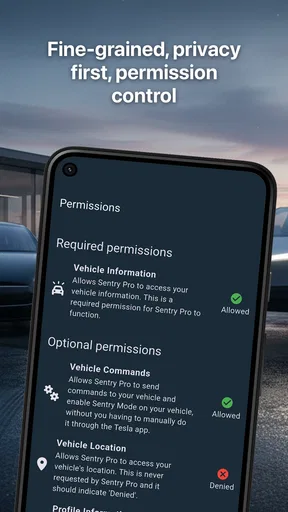
What are the main privacy concerns with Sentry Pro—Tesla Notifications?
Users should be aware of privacy policies regarding data collected by the app, especially related to video feeds and location data. Ensure the app complies with privacy regulations and offers user consent for data collection. Reviewing the app’s privacy policy can help users understand how their information is used and stored.
